Microsoft has created the new Surface Laptop Studio with three kinds of users in mind. If you’d describe yourself as a designer/artist, social content creator, or software developer, then it’s made for you. Here’s why…
For… pro designers, creators and artists
The Surface Laptop Studio gives you the option of using it like an easel (more on this below). So it’s great for drawing on (especially if you get a Surface Pen), creating designs and sketching out ideas. You can then switch back to the desktop setup and finish things off properly.
Plus, because the Surface Laptop Studio is powered by NVIDIA® Studio, all your favourite creative apps (like Adobe Illustrator and Photoshop) will be super-fast, responsive, and updated. So when you’re on a creative roll, you’ll get exactly what you need.
For… Tik Tokers, YouTubers and other social content creators
You’ve got everything you need to record quality content and share it instantly with your adoring masses. The webcam and mic are top quality, so you can shoot crystal-clear video footage that sounds great. And thanks to the long battery life you’ll be able to keep posting, replying, and being social all day long – even when you’re on the go.
For… developers
Software developer? Then you can easily compile, run and debug cycles in Microsoft Visual Studio. And with the large and sharp display, you can see every part of your code in full view.
The Surface Laptop Studio also comes with support for Thunderbolt 4. With two USB-C Thunderbolt 4 ports on the left side, you can connect all the external monitors and accessories you need to get the job done.
What’s so great about Surface Laptop Studio?
The Surface Laptop Studio has an awful lot going for it. In fact, it’s one of the most attractive and innovative laptops we’ve ever tried out. Here are a few things about it that made us smile the most:
Flexible design
Sure, the Surface Laptop Studio opens up just like a laptop. No surprises there. But there’s more.
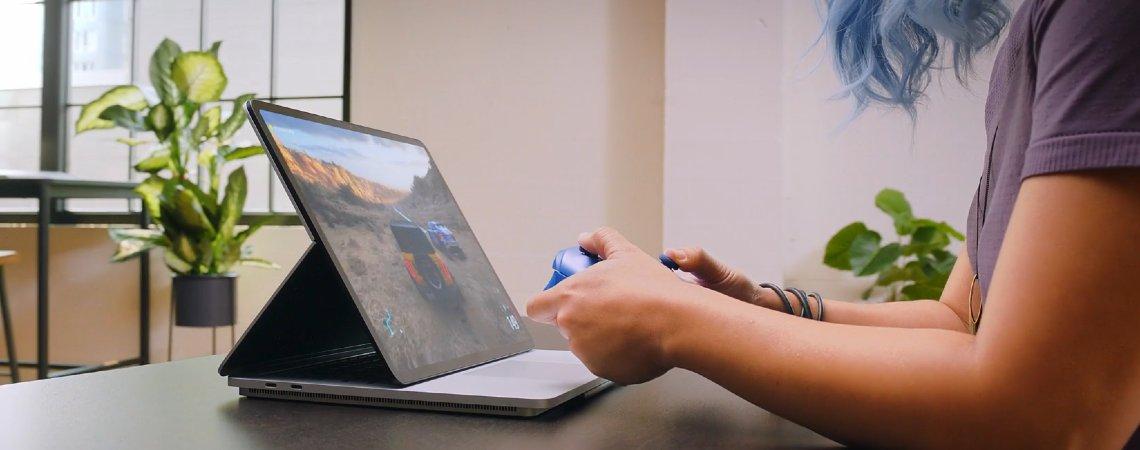
Pull the screen forward until it covers the keyboard, and you’ve got an easel for drawing and sketching on – that’s Stage Mode.

It’s much sturdier than laptop mode, because it has an additional support at the back. And with the keyboard out of the way, watching videos and playing games (with a controller) is really immersive.
Pull the screen even further forward, and you’ve got a digital canvas that lies completely flat – Studio Mode.

With the Surface Pen, it’s a great (and really comfortable) way of drawing, writing notes, and editing pictures, videos or audio files.
Stunning touchscreen display
The 14-inch PixelSense display is an absolute stunner. It’s incredibly bright (504 nits to be exact), colours are accurate enough for tasks like photo editing or digital painting, and the resolution is pin sharp. 2,400 x 1,600 pixels puts it somewhere between Full HD and 4K.
Then there’s the 120Hz refresh rate. It makes this laptop a joy to use, with swiping and scrolling feeling ultra-smooth and responsive. Refresh rates over 60Hz used to be reserved for dedicated gaming laptops, so it’s great to see it here.
A standout webcam
The Surface Laptop Studio webcam is another feature way better than you’ll find on other laptops. In fact, its 1080p HD resolution is right up there with any standalone desktop PC webcam.
Video quality is sharp, low-light performance is especially good, and there’s even a feature that makes skin-tone accurate. When it comes to sound, we found that the dual studio mics captured our voices clearly and accurately. Good news for content creators wanting to look and sound their best.
Plenty of power under the hood
The Surface Laptop Studio is the most powerful Surface yet, with an Intel Core i7-11370H processor running the show. We opened dozens of Edge tabs at the same time along with a few Office programs, and we couldn’t detect any slow down at all.
And finally, battery life impressed us too. We always managed to last a whole day (at least 11 hours of constant use) before we needed to head to the charger.

Need any help?
Need more help deciding if the Surface Laptop Studio is for you? Then chat to one of our tech experts on ShopLive. They’ll happily answer all your questions, and they can help you checkout when you’ve made your choice.