Indoor golf simulators have exploded in popularity over the last few years. And it’s pretty easy to see why. Whether you’re playing in regular tournaments or love a casual round of 18 on a Sunday with your mates, they’re a fun (and convenient) way to practice your swing, rain or shine.
With the right setup, you can play famous courses, improve specific skills or jump into multiplayer games – all from the comfort of your place. But where do you even start? In our guide, we’ll cover everything you need to know, from the space you’ll need to the best options for small rooms and loads more. Let’s tee things off…
What is an indoor golf simulator?
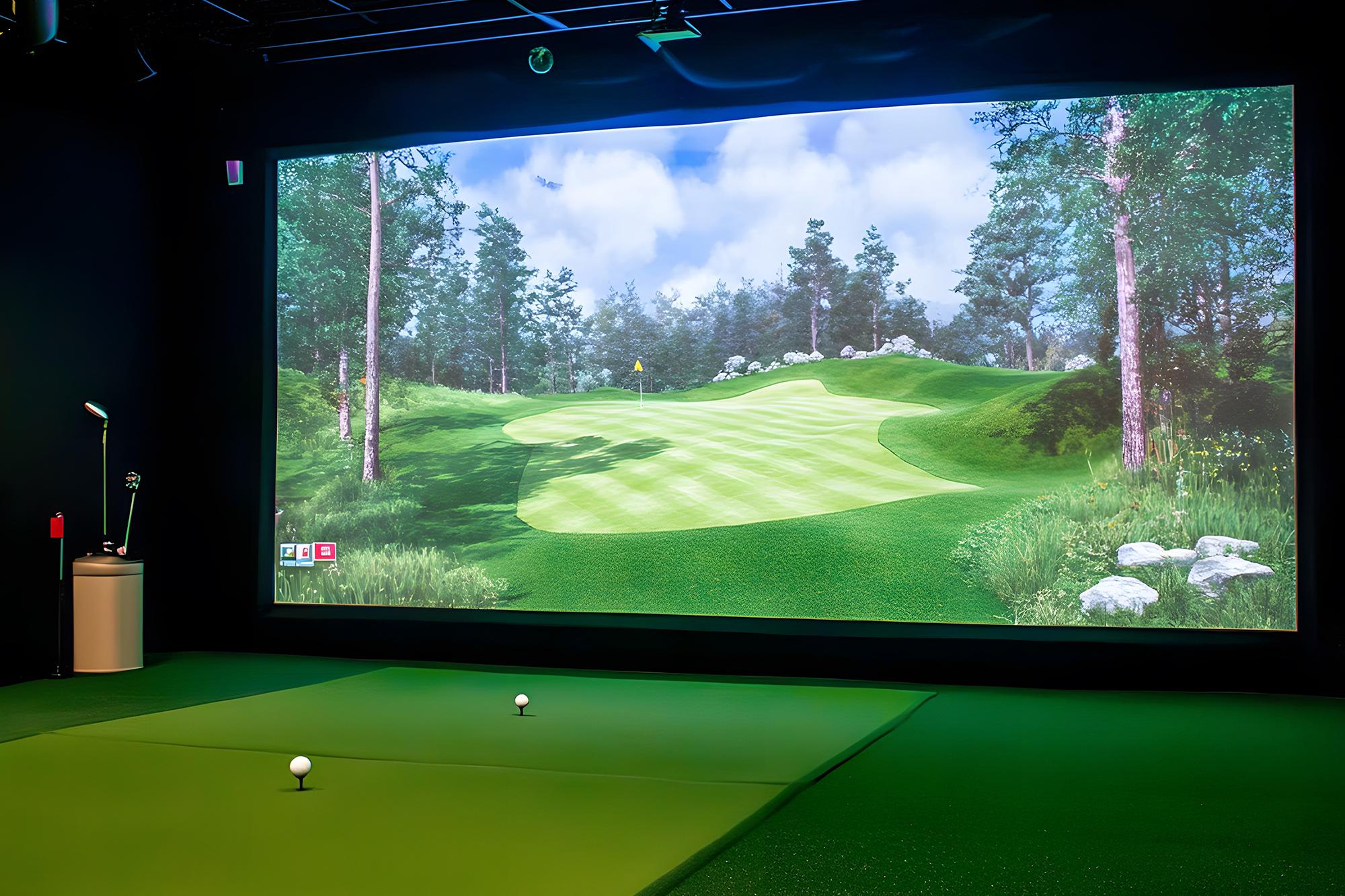
It’s pretty much exactly what it sounds like. An indoor golf simulator is a tech-powered setup that lets you play golf virtually. Instead of hitting balls on a real course, you swing indoors and watch your shot play out on a screen. Radar, cameras and sensor mats combine to track your swing and the flight of the ball, which then simulate each shot using software.
Unlike just hitting into a net, simulators give you real-time feedback – covering everything from ball speed to the spin on it. Some will even go as far as modelling accurate terrain and wind speeds too. And both add a whole other layer of challenge to your sessions!
They’re used by everyone who loves the game. You’ll find PGA pros brushing up on their technique post tournament. While weekend players use them to stay competitive (and keep their handicap nice and low). So, if you get one, you’re in good company.


How do they work?
At the heart of every good simulator is the launch monitor. This clever device tracks your swing using a mix of cameras, radar or optical sensors. It captures a ton of data too. Everything from the speed of your club to the ball trajectory and face angle of your club is picked up. It’s really smart stuff.
That data is then fed into simulation software, which recreates the quality of your shot on a virtual course. Scuffed it? Your ball’s probably going to dribble into the long grass. Struck it sweetly? Who knows maybe it’ll be a hole in one.
Don’t forget the impact screen or net. This’ll catch the ball and stop it from flying dangerously around your room. And if you plan or getting really immersed, definitely grab yourself a projector. It’ll display the whole course and make it feel like you’re really there.
Speaking of immersion, some systems are incredibly advanced. If you shell out a bit more, you might get spin control, rough simulation and even weather effects. They’re super realistic. But thankfully, you won’t need to pack your umbrella.

What space do you need?
Space is key when planning your setup. For a full swing simulator, you’ll typically need:
Width – 4 to 4.5 metres.
Length – 5 to 6 metres.
Ceiling height – At least 3 metres.
If you’re tight on space, don’t worry – there’s plenty of compact options out there. Putting-only simulators can fit in spare rooms or hallways. While a more portable rig is easy to set up and tear down in garages or sheds.
Top tips:
Measure carefully before buying.
Consider the height of your ceiling for full swings.
Use retractable screens to save some space.

Putting simulators vs full swing setups
Putting simulators focus on your short-game skills like green reading and distance control. They’re compact, more affordable and are great for improving accuracy. But your pitching, putting and sand wedge skills will all need to be on point.
Full swing setups cover everything – drives, irons, chips and putts. They’re ideal for serious training but obviously need more space and a bigger budget to get started.
| Feature | Putting Simulators | Full Swing Setups |
|---|---|---|
| Space Needed | Small – fits in spare rooms or hallways | Medium to Large – requires more ceiling height and swing space |
| Skills Improved | Putting, green reading, distance control | Full game – drives, irons, chips, and putts |
| Cost | Lower – fewer components and simpler setup | Higher – includes launch monitor, screen, projector, and more |
| Best For | Beginners, casual players, small spaces | Intermediate to advanced golfers, serious training |
| Tech Features | Basic stats and feedback | Advanced analytics, game modes, course simulation |
| Combination Setup | Can be part of a hybrid setup | Can include putting features for full coverage |
| Long-Term Value | Great for short-game improvement and casual use | Offers full skill development and immersive experience |
What accessories do you need?
To get the most out of your simulator, you’ll need a few key accessories. You won’t have to hire a caddy to carry your clubs though!
Essentials:
Hitting mat – This is where you’ll stand and swing. It protects your floor and simulates the fairways and greens of a proper course. Some even have built-in tee slots or different turf textures for mixing up your practice.
Impact screen or net – These catch your golf balls safely (no smashed vases here) and display the virtual course if you’re using a projector. They’re made from super durable, ballistic-grade materials and can double up as a cinema screen. Nets are a much simpler, budget-friendly alternative.
Launch monitor – The brain of your simulator. It tracks your swing and ball flight, and without it, you won’t get any data or shot simulation. Accuracy varies by model, so pick one that suits how serious you are about your game.
Optional extras:
Projector – It’ll display the virtual course on your impact screen, making every moment a lot more immersive. While it’s not essential, it does add some wow factor, and means gameplay is extra realistic.
Ball dispenser – This handy little device automatically feeds balls onto your mat, saving time and effort while you practice. It’s particularly useful during a long sesh or when you’re working on repetitive drills.
Lighting – Good lighting will let you see properly and helps any sensors to track your swing accurately. You might not be hitting a birdie on every hole, but each part of your game should be a tad more precise.
Software subscriptions – A lot of simulators offer extra features – like more multiplayer modes, famous courses and advanced analytics. These will definitely flesh out your experience but generally come with monthly or annual fees.

Best options for small spaces
Even if you haven’t got the space to swing a cat (or a golf club for that matter), there’s still some great options out there. Here’s a few of our favourites…


How much do they cost?
Prices vary quite a bit, depending on the features and quality of the system you go for.
Price ranges:
Entry-level – £300 to £800 (basic putting simulators, portable monitors).
Mid-range – £800 to £2000 (good accuracy, some course play).
High-end – £2000 to £10,000+ (full swing setups, advanced analytics, premium visuals).
Additional costs:
Projector and screen.
Software subscriptions.
Installation and calibration.
Space modifications (e.g. lighting and flooring).
Compared to regular visits to the driving range, simulators have a lot of long-term value – especially if you use them often enough. At the end of the day, it all comes down to personal preference.

Training vs entertainment – what can you use them for?
Golf simulators aren’t just for serious practice. They’re also loads of fun.
For training:
Swing analysis – Most simulators will note down a bunch of different metrics. That could be ball spin. Or how fast your club is moving during your swing. All of this is great for improving your technique and tightening up the weaker parts of your game.
Video replay – Some of the more high-end models will give you video playback of your swing. And that lets you check out your form and compare it against previous sessions or even the pros. Getting that swing consistent every time is key.
Practice ranges – Forget jumping in the car and heading to the driving range. Instead, you can hit a few balls on a virtual one, making it easy to work on specific clubs or shot types without the pressure. Oh, and instead of that small bucket of balls, you’ll have unlimited shots!
Shot tracking – Advanced simulators track each shot’s flight path, plus their distance and accuracy. Over time, you’ll then build up a history of your shot performance. And with these stats, you’ll be able to monitor your progress and set some goals.
For entertainment:
Multiplayer modes – Invite your friends or family over for a golfing head-to-head. Or compete online for the bragging rights instead. There’ll be tournaments, mini-games or casual rounds to choose from. And only one of you will get the famous green jacket at the end!
Arcade-style games – It’s not all about the traditional stuff. Some systems include fun golf games like target challenges or obstacle courses. These are perfect for kids or casual players who don’t want to play a full 18 holes.
Famous course play – You can tee off at legendary courses, virtually recreated in amazing detail. It’s a great way to try out a bucket list location without booking an extremely expensive round.
Cinema screen use (with projector) – If your setup uses a projector and impact screen, it can double up as a home cinema. Switch from golf mode to movie night and watch your favourite flicks on the big screen. Or, why not relive Europe’s epic Ryder Cup victory from this year in style?

Maintenance & setup tips
Setting up your indoor golf simulator – and keeping it in good shape – makes a huge difference in performance, accuracy and longevity. Whether you’ve gone for a compact putting simulator or a full-swing setup, here’s how to get the most out of it…
Getting started
Choose the right location – Pick a space with enough room for your swing. For full setups, aim for at least 3m ceiling height and 5-6m length. Garages, lofts and spare rooms are always a popular spot. Just make sure the floor is level. Otherwise, you won’t be hitting straight.
Position your screen and mat properly – The hitting mat should be lined up with the centre of your impact screen or net. If you’re using a projector, mount it so the image fills the screen without shadows from your swing. They’re pretty distracting.
Calibrate your launch monitor – Follow the manufacturer's instructions to calibrate your device. This’ll make sure you get accurate readings for all those important stats – from club speed to ball spin and trajectory. Some monitors need to be popped at a specific angle or distance from the ball though, so check the specs first.
Control lighting – Direct sunlight or harsh overhead lighting can interfere with your sensors or projectors. Keep them out of it if you can. Soft, indirect lighting always works best – a few LED spotlights paired with a blackout blind is a great combo.
Secure your equipment – Use brackets or mounts for screens and projectors to stop them from moving around. And make sure any cables are tucked away to avoid tripping hazards. After all, you’ve already got water hazards to contend with on the course – you don’t need anymore.
Maintenance
Clean sensors and cameras regularly
Use a microfiber cloth to gently wipe down the lenses and sensor surfaces.
Avoid harsh chemicals – just a bit of water or screen-safe cleaner will be enough.
Check your hitting mat and screen for wear
Over time, mats can flatten or tear in those high-use spots. Replace them when they lose their bounce or start to feel uneven.
Impact screens might fray or stretch. Give them a quick once over and tighten or replace them if they’re looking worse for wear.
Update your software
Most simulators come with downloadable updates. These might improve the accuracy, add some new courses or fix pesky bugs.
Set yourself a reminder to check for updates each month.
Store accessories properly
Keep any balls, remotes and swing sticks/clubs tucked away when you’re finished.
If your setup is portable, fold and store it to stop it from getting damaged.
Recalibrate every so often
Even if your simulator seems accurate, it’s worth recalibrating it every few months. It’ll help to keep it nice and precise.
This is really important to do if you move the setup or change up your lighting.

FAQs
Are indoor golf simulators worth it for beginners?
Definitely. They’re a great way to learn the basics, get feedback and build up your confidence. And you’ll be playing in a low-pressure environment too. So, even if you do shank one into the rough – or lose a ball in the lake – it won’t matter at all. And your mates won’t be there to rib you for it!
Can I use real golf balls indoors?
You can, you’ll just need to make sure your screen or net is rated for impact. And if you’re worried about accidentally slicing a ball into your telly, some setups also work with foam or plastic balls. They’re on the safer side for sure.
How accurate are golf simulators?
High-end models are extremely accurate, tracking spin, the launch angle of the ball and more. Even budget options offer useful feedback though. But, like any bit of tech, the more you spend, the better the experience is going to be.

Can I play famous golf courses virtually?
Yes! A lot of simulators come with iconic courses like St Andrews, Pebble Beach and Augusta. So, if you’ve ever fancied seeing how you’d fare on the PGA tour, now you can.
How long does it take to set up a golf simulator?
Basic setups can be ready in under an hour. More advanced systems might take a few hours, especially if you’re mounting screens or projectors.
Need more advice?
Golf simulators are pretty specialist bits of kit. So, if you fancy a chat with someone who knows their 9 iron from their sand wedge, we’ve got you covered. Pop over to Shoplive and speak with one of our expert colleagues. They can pitch in with their suggestions before you spend any cash. And you won’t even have to leave the house either.