If someone told you 20 years ago that you’d eventually be playing games without any actual hardware, you’d probably look at them funny. But now, with Xbox Cloud Gaming, you can do exactly that. Grab your phone or plonk yourself down in front of the telly, and you can stream a new adventure straight to it. No wires. No Xbox console. No nothing.
But how does this tech actually work? And is it even any good? We’ve got the answers right here…
What is Xbox Cloud Gaming?
It’s Microsoft’s very own cloud-based gaming service. Sign up to an Xbox Game Pass Ultimate subscription, and you can stream the latest titles to loads of different devices over the internet. And this completely eliminates the need for a gaming PC, or a physical console under your telly. That’ll save some money and space then…
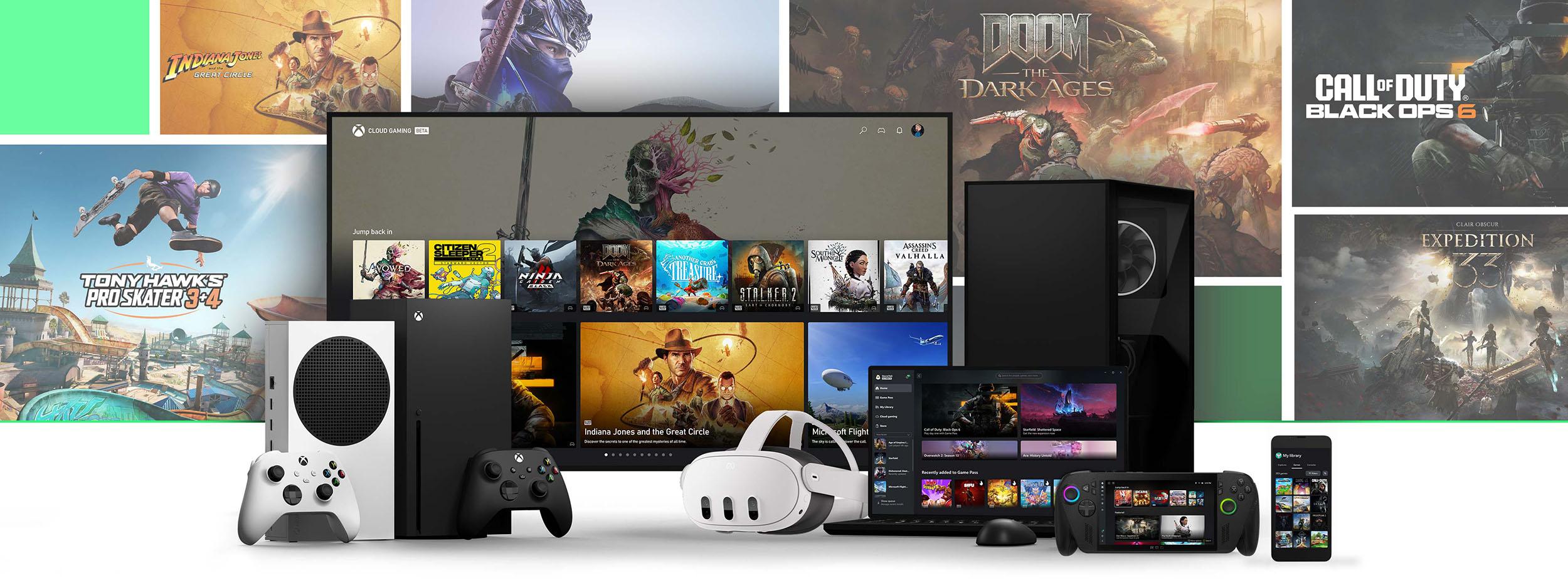
It doesn’t really matter what gadgets you’ve got either. With Xbox Cloud Gaming, you can play games on anything from your smart TV, VR headset and phone to your tablet or laptop. So, pretty much everyone can get in on the action.

How does Xbox Cloud Gaming work?
Now for the clever part. Xbox Cloud Gaming works by streaming games from Microsoft’s data centres straight to your device. When you start a game, the data centre does the legwork – processing the graphics and sending a video stream to your gadget in real-time. Basically, no strain is put on your tech whatsoever.
Your inputs (like button presses or moving the analogue sticks) are sent back to the data centre. They’re processed and the updated ‘game state’ gets streamed back to you. This all happens so fast, that it feels exactly the same as if you were playing the game locally. As long as your internet’s good, you shouldn’t notice any pesky lag at all.
What games are on Xbox Cloud Gaming?
There’s way more than we can mention here. But safe to say, all the big hitters are there – like Avowed, Call of Duty, Forza and Halo. Throw in plenty of unique indie titles, and it’s got a little bit of something for everyone.
The library is constantly getting updated too. So, you’ll always have access to the latest and greatest games. For a full list of titles, you can head on over to the official Xbox website.

How much does Xbox Cloud Gaming cost?
Xbox Cloud Gaming comes as part of an Xbox Game Pass Ultimate subscription. So, if you’ve already got one of those, you’ll be able to stream titles at no extra cost. Not a subscriber yet? It’ll cost you £12.99 per month if you do decide to dive in. And for that, you’ll get access to a massive library of games, Xbox Live Gold (for playing online) and other cool extras.
What do you need to get started?
To start using Xbox Cloud Gaming, you’ll need a few things first:
Xbox Game Pass Ultimate subscription – sort this one out first before doing anything else.
A compatible device – like a tablet, laptop, phone, smart TV, VR headset etc.
A strong internet connection - Microsoft recommends a 10Mbps+ download speed.
A compatible controller - while you can use touch controls on phones/tablets, a Bluetooth controller will give you a much better experience.

Best devices for Xbox Cloud Gaming
Like we’ve already mentioned, Xbox Cloud Gaming is designed to be accessible on loads of different devices. Here are some of the best we’d recommend right now…
Best laptops for Xbox Cloud Gaming
Apple MacBook Air – The clue’s in the name. It’s super lightweight, making it ideal for gaming on the go. As long as you’ve got an internet connection – or some rock solid 5G – you can play pretty much anywhere.
ASUS ROG Zephyrus G14 – This gaming laptop combines nippy performance with a long battery life. Which is perfect for when you get sucked into the latest fantasy RPG and want to sink a few more hours in.
Best tablets for Xbox Cloud Gaming
Apple iPad Pro – With the large display, you’ll see even more of the action. While a high refresh rate keeps your gameplay super smooth. Especially during fast-paced moments like races or massive blockbuster set pieces.
Samsung Galaxy Tab S7+ - Games look epic on the vibrant AMOLED screen. Add to that a beefy processor, and there’s nothing here that’s going to slow you down. And that’s key, especially during tough boss fights where every move counts.
Best smart TVs for Xbox Cloud Gaming
Samsung smart TVs – Samsung 2020 models or later support the Xbox app. It’s built into the Samsung Gaming Hub (the brand’s dedicated gaming platform) for their newer smart tellys. Activate your Game Pass subscription, get your controller and you’re good to go.
LG smart TVs – Any LG TVs running webOS 24 or newer (including selected 2022 and 2023 models with the latest software update) will work with the Xbox app. Can’t find it? Go to the LG Gaming Portal on the TVs Home Page.

Xbox Cloud Gaming on Amazon Fire TV devices
If you’ve got an Amazon Fire TV device, you’re in luck. It’s an ideal budget friendly way to play games on your TV. Xbox Cloud Gaming works on all of these models below:
Fire TV Stick 4K Max (1st Gen)
To get started, you’ll need to download the Xbox Game Pass app from the Amazon Appstore. Once that’s installed, you can sign in with your Xbox Game Pass Ultimate account and start streaming games. Make sure to grab yourself a Bluetooth controller too – otherwise you won’t have any way to play!
Xbox Cloud Gaming on Meta Quest headsets
If you prefer your gaming on the VR side of things, Microsoft have you covered too. Compatible Meta Quest headsets (including Meta Quest 2, Meta Quest 3, Meta Quest 3S and Meta Quest Pro) let you get immersed in all sorts of adventures.
To get started, head to the Meta Store and grab the Xbox Game Pass app. Just remember, you’ll still need a Game Pass subscription and a controller to start your next quest.

Is Xbox Cloud Gaming better than downloading?
That honestly all comes down to personal preferences and your circumstances. It’ll be different for everyone…
Pros of Xbox Cloud Gaming:
It’s cheaper – after all, you don’t need any hardware (like an Xbox Series X or Xbox Series S) to play.
Because you’re streaming, there’s no waiting around for games to finish downloading.
All of your save data is stored in the cloud, not on the device you’re gaming on. Meaning more room for other stuff!
Play anywhere with an internet connection on almost any sort of device.
Cons of Xbox Cloud Gaming:
Downloaded games are usually more stable and can be played offline. That’s not the case with cloud gaming.
You need to have a good internet connection – if you don’t, your character will be stuttering all over the place.
Your resolution is capped at 1080p. If you’re used to playing in shiny 4K, you’re going to notice a big difference in quality.
There’s no local multiplayer, no Quick Resume and you can’t record that epic killstreak or live stream your victories.
Settings like frame rate boosting and high graphics modes can’t be selected.

How does Xbox Cloud Gaming compare to other services?
Xbox Cloud Gaming isn’t the only one of its kind. Other companies are dipping their toe into the world of cloud gaming too. Here’s how the most popular stack up…
Xbox Cloud Gaming:
Library – Includes 100s of Xbox Game Pass Ultimate games and first-party titles.
Cost – Comes as part of an Xbox Game Pass Ultimate subscription (£12.99 per month)
Devices – Works on smartphones, tablets, laptops and smart TVs.
Performance – Generally good but can be affected by your internet speed.
NVIDIA GeForce Now:
Library – Choose from over 2000 PC games, from indie gems to blockbuster hits.
Cost – £9.99 a month for the Priority tier or £19.99 for the Ultimate tier.
Devices – Will run on Windows, macOS, Android and NVIDIA Shield devices.
Performance – Has higher frame rates and better resolution, but you’ll need a really powerful internet connection.
Amazon Luna:
Library – Offers a big variety of games (100+), including some exclusive titles.
Cost – Included with Amazon Prime (which will set you back £8.99 a month).
Devices – Supports Amazon Fire TV, Windows, mac OS and Android devices.
Performance – Generally good but can vary based on internet speed and the capabilities of your device.
Want to see which new adventures are hitting Xbox in the next few months? Here’s the biggest upcoming Xbox games in 2025. And if you want to get the most out of your new console, we’ve covered everything you need to know about the Xbox Series X.